
也不知道 WorrdPress 什麼時後有這功能,我是看到 WordPress 的更新提示,發現它有子佈景主題,就來研究一下
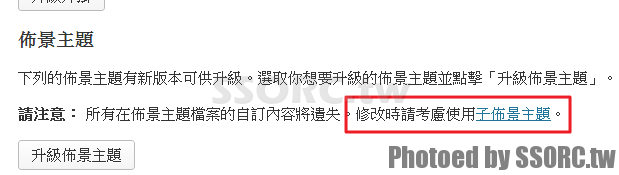
怎麼作
我是用 catch-box,在 themes 裡新增目錄 catch-box-child (-child 可以隨便訂)
把 style.css 複製到 catch-box-child 裡
編輯 style.css
- Theme Nmae : 主題名稱 (隨便給)
- Template : themes 的目錄名稱 (我給 catch-box-child),不是主題名稱喔
- @import url(“../catch-box/style.css”); /* 假如我仍要使用原佈景主題的內容,我只要改幾項而已,這裡的功能是會繼承延用 catch-box 裡的 style.css */
- Author : 可有可無
- Author URI : 可有可無
/*
Theme Name: Catch Box Child
Template: catch-box
Theme URI: http://catchthemes.com/themes/catchbox
Author: Catch Themes Team ,fixed by ssorc
Author URI: http://catchthemes.com
*/
@import url("../catch-box/style.css");
再到 WordPress 後台啟用我新增的這個佈景主題,你會看到是會同時存在 catch-box 與 catch-box-child 的,這兩個是必要的。
那我自訂的要怎麼放 ?
我在 style.css 改了幾個地方 (原 catch-box),就長、寬
68 /* =Structure
 69 ----------------------------------------------- */
 70
 71 body {
 72 padding-top: 2em;
 73 }
 74 #page {
 75 margin: 0 auto 2em;
 76 max-width: 1100px; /* fixed by cross */
 77 }
 78 #branding hgroup {
 79 margin: 0 3%;
 80 padding: 2.5em 0;
 81 }
 82 #access div,
 83 #access-secondary div,
 84 #access-footer div {
 85 margin: 0 3%;
 86 }
 87 #primary {
 88 float: left;
 89 margin: 0 -35.5% 0 0;
 90 width: 100%;
 91 }
 92 #content {
 93 margin: 0 38.6% 0 3%;
 94 width: 71%; /* fixed by cross */
 95 }
 96 #secondary {
 97 float: right;
 98 margin-right: 3%;
 99 width: 21%; /* fixed by cross */
 100 }
 101
 102 /* Right Content */
 103 .sidebar-content #primary {
而 catch-box-child 裡的 style.css 我是改成
/*
Theme Name: Catch Box Child
Template: catch-box
Theme URI: http://catchthemes.com/themes/catchbox
Author: Catch Themes Team ,fixed by ssorc
Author URI: http://catchthemes.com
*/
@import url("../catch-box/style.css");
#page {
 margin: 0 auto 2em;
 max-width: 1100px; /* fixed by cross */
}
#content {
 margin: 0 38.6% 0 3%;
 width: 71%; /* fixed by cross */
}
#secondary {
 float: right;
 margin-right: 3%;
 width: 21%; /* fixed by cross */
}
可以照著我修改的跑,沒什麼大問題
我還有改到 content.php 、content-single.php ,也直接放到 catch-box-child 裡
我覺得小變動還可以這麼作,但如果大變動仍需要比較修改一次
問題修正
- 佈景主題(外觀)裡的選單會不對,但原設定的內容不會不見,修正就好
參考 :
- http://s3131212.tw/wp-child-themes/
- http://codex.wordpress.org/Child_Themes
留言